

If you are comparing n8n vs Make vs Zapier, the short answer is this: pick Zapier when a non-technical team needs simple automations quickly, pick Make when you want a visual builder with more control over branching and data, and pick n8n when volume is high, data must stay on your own servers, or the logic needs real code. The rest of this guide explains why, and how to decide for your own case.
We build on all three at Tech Inject, so this is a comparison from the people who get called when an automation breaks, not a feature checklist.
The short comparison
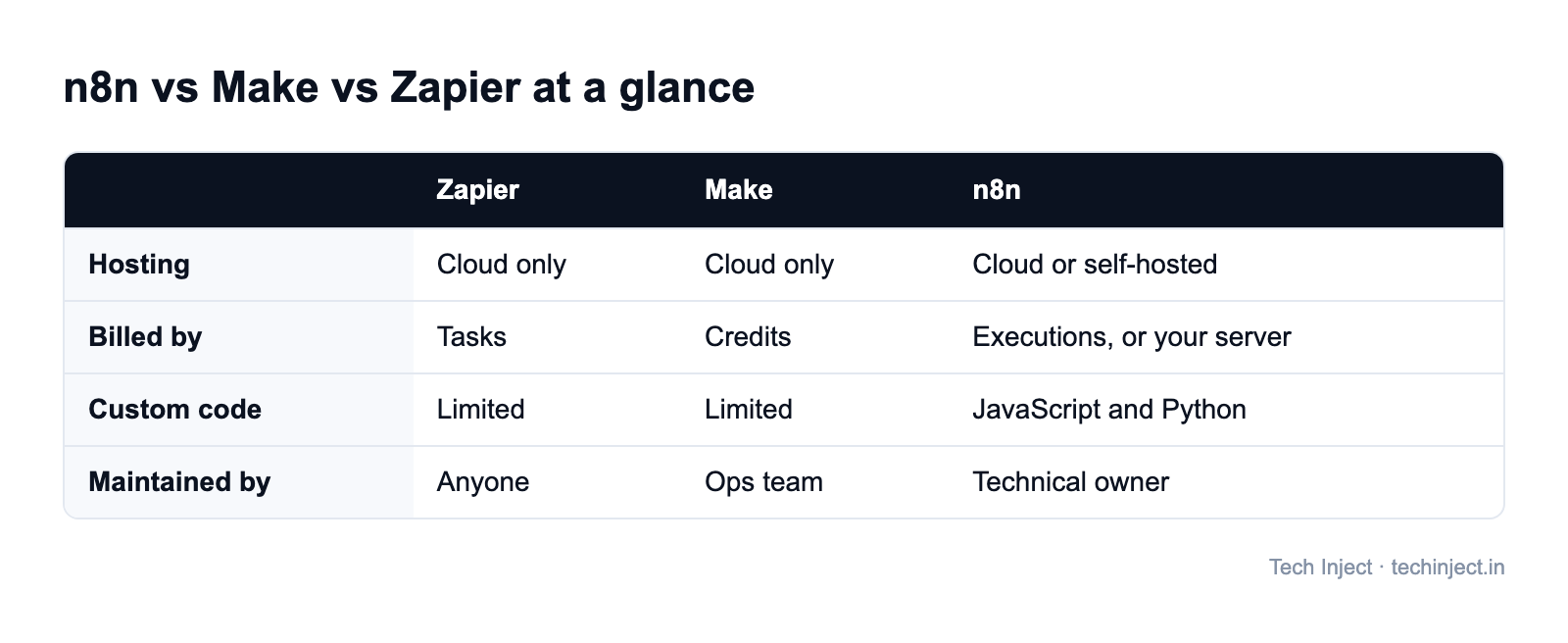
- Zapier: cloud only, billed by tasks, the largest library of ready-made app connections, and the easiest for anyone to pick up.
- Make: cloud only, billed by credits consumed as modules run, a visual canvas with routers, iterators and proper error handlers.
- n8n: n8n Cloud or self-hosted on your own server, billed by workflow executions on Cloud, with JavaScript and Python code nodes and strong AI agent tooling.
Plans and allowances change often, and third-party articles regularly disagree with each other. Use the vendors' own pages for current numbers: n8n pricing, Make pricing and Zapier pricing.
How each tool bills you, and why it matters
The billing unit shapes how you should build.
Zapier counts tasks, which are the actions a workflow performs. A five-step workflow that runs a thousand times uses several thousand tasks. That is easy to reason about and gets expensive as volume grows.
Make counts credits, consumed as modules run inside a scenario. A scenario that polls an app every few minutes, or loops over every row of a sheet, uses credits even when nothing useful happens. Design choices such as webhooks instead of polling, and filters placed early, have a direct effect on the bill.
n8n Cloud counts executions, meaning one run of a whole workflow regardless of how many steps it contains. A long workflow costs the same as a short one. Self-hosted n8n has no per-execution fee at all on the Community Edition, so cost is your server plus the time to maintain it.
A practical rule: estimate your monthly runs and the average number of steps, then price that on each platform before you build anything.
Hosting and data control
Zapier and Make are cloud services. Your data passes through their infrastructure, which is fine for most marketing and sales workflows.
n8n is the only one of the three you can run yourself. The Community Edition is distributed under n8n's Sustainable Use License, which allows internal business use. Self-hosting matters when contracts or regulation say customer data must stay in your environment, or when you want credentials for internal systems to never leave your network.
Self-hosting is not free in practice. Someone has to apply updates, back up the database, watch for failed runs and keep the server patched. If nobody on your team will own that, use n8n Cloud or pay for it to be managed.
Custom logic and AI agents
All three handle straightforward trigger-and-action flows well. They differ once the logic gets awkward.
Zapier and Make offer formulas, filters and limited code steps. When a process needs to reshape nested data, call an API with unusual authentication, or apply business rules with many exceptions, you end up fighting the tool.
n8n lets you drop a JavaScript or Python code node anywhere in a workflow, call any HTTP API, and build custom nodes. Its AI agent nodes let a model use tools, keep memory and call sub-workflows. For anything beyond a single "summarise this" step, that flexibility matters.
Whichever tool you choose, treat AI steps with the same care. Make the model return structured output, validate it, and send anything uncertain to a person. Keep pricing, approvals and other business rules in plain logic, not in a prompt. We cover that pattern on our AI automation services page.
Reliability: the part most comparisons skip
A workflow that works once in the editor is not the same as one that survives real data. Before choosing a tool, ask how it will handle these four situations:
- The same event arrives twice. Webhooks get retried. Without a duplicate check you create two orders or send two emails.
- An API times out halfway through. You need retries, and you need to know which steps already ran.
- The data is not what you expected. An empty field or an odd date format should be caught early, not three steps later.
- Something fails at 2 a.m. A named person should get an alert with enough detail to replay the run.
Make has built-in error handlers and incomplete-execution storage, which many scenarios never use. n8n has error workflows, retry settings and full execution logs. Zapier offers replay of failed runs and error notifications. The tools are capable; the difference is whether the person building your automation sets these up.
Who will maintain it?
This question decides more projects than any feature does.
- If the owner is a marketer or office manager, choose Zapier, or Make with some training.
- If the owner is an operations person who is comfortable with data and logic, Make is a good fit.
- If you have a developer, or a partner on a retainer, n8n gives the most room to grow.
An automation that nobody on your team understands is a liability, whatever it is built on.
A simple way to decide
- List the three to five processes you want to automate, with rough monthly volume for each.
- Mark any that involve data which must stay in your own environment. If there are some, n8n self-hosted moves to the top.
- Name the person who will own the automations day to day, and choose a tool they can read.
- Price your volume on the candidates using the vendors' pricing pages.
- Build one workflow end to end, including error handling, before committing to the rest.
Most small teams land on Zapier or Make and are well served. Teams with high volume, sensitive data or a developer usually land on n8n. Mixing is normal too: a customer-facing tool for the marketing team and n8n for back-office integrations.
Where Tech Inject fits
We design and build automations on n8n and Make, and we migrate between platforms when the numbers justify it. Every build includes duplicate protection, retries, error alerts, a run log and a human approval step on anything that moves money or messages a customer.
If you would like a second opinion on which platform suits your processes, get a free project scope. We will review one real workflow with you and tell you plainly what it would take, including when the answer is to keep what you have.
Frequently Asked Questions
It depends on who will maintain it. n8n gives more control, can run on your own server and handles code and AI steps well, but it needs a technical owner. Zapier is faster to start and easier for non-technical staff. For simple, low-volume automations Zapier is often the better choice; for high volume or sensitive data, n8n usually is.
The self-hosted Community Edition has no licence fee and no per-execution charge, but you pay for the server and take on updates, backups and monitoring. n8n Cloud is a paid subscription with a monthly execution allowance. Check n8n's pricing page for current plans.
Yes, but workflows are rebuilt, not imported. List every automation you have, rebuild the highest-cost or highest-risk ones first, run old and new side by side, and switch over once the results match.
All three can call AI models. n8n has the deepest agent tooling, with tools, memory and custom code in the same workflow. Make and Zapier are fine when the AI step is a single task such as classifying or summarising a record.