


In today’s digital world, email is a crucial way to communicate, especially for businesses. From password resets and purchase receipts to notifications and welcome messages, transactional emails are important for user experience. However, managing these emails can be difficult and time-consuming. This is where Resend comes in to make the process simple and efficient. In this blog post, we'll explore how Resend can help you manage transactional emails easily and effectively.
What is Resend?
Resend is a tool designed to send transactional emails. It provides an easy-to-use API that integrates with your application, ensuring that your emails are delivered quickly and reliably. Whether you are a developer working on a small project or part of a large business, Resend offers the features and flexibility needed to handle all your email communication.
Why Choose Resend?
1. Simplicity and Ease of Use
Resend is very simple to use. With its easy API, developers can quickly add email sending features to their applications without dealing with complicated setups. The clear documentation and easy setup mean you can start using it quickly.
2. Reliability and Scalability
Transactional emails need to be delivered on time and reliably. Resend ensures that your emails reach the inbox and not the spam folder. It is built to handle large volumes of emails as your user base grows, making it a great choice for businesses of all sizes.
3. Detailed Analytics
Knowing how your emails perform is important. Resend provides detailed analytics, giving you insights into delivery rates, open rates, click rates, and more. This data helps you improve your email strategies and increase user engagement.
4. Template Management
Managing email templates can be difficult, but Resend makes it easy. You can create, edit, and manage your email templates directly within Resend. This ensures consistency and saves valuable time. The ability to use dynamic content in templates also allows for personalized user experiences.
5. Security and Compliance
With increasing concerns about data privacy, ensuring the security of your email communications is crucial. Resend offers strong security features, including encryption and compliance with regulations like GDPR and CCPA, to protect your user data.
6. Supported Languages
JavaScript/Node.js , Python , Ruby , PHP , Java , C#/.NET , Go , Swift (for iOS apps) , Kotlin (for Android apps) , C++ , Perl.
Getting Started with Resend
Integrating Resend into your application is easy. Here’s a step-by-step guide to get you started:
1. Sign Up and Get Your API Key
First, sign up for a Resend account. Once you’ve registered, you’ll receive an API key, which you’ll need to authenticate your requests.
2. Integrate the API
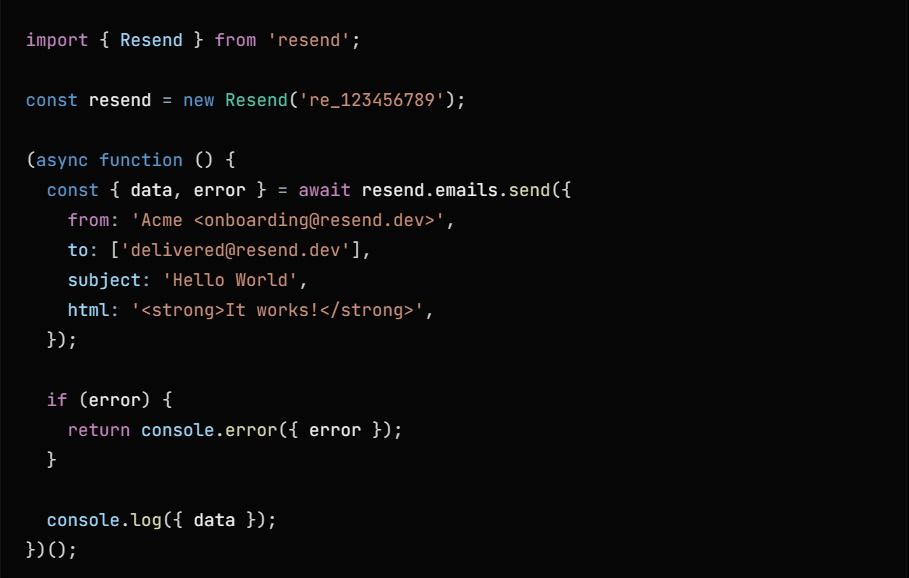
Using your preferred programming language, integrate the Resend API into your application. Here’s a simple example using Javascript:
3. Create and Manage Templates
Within the Resend dashboard, create your email templates. Use placeholders for dynamic content that will be filled with user-specific information when the email is sent.
4. Send Your Emails
With the API integrated and templates ready, you can start sending emails triggered by user actions, such as sign-ups, purchases, or password resets.